
What is Vibe Coding?
Vibe coding is a new way of creating computer programs and applications. Instead of writing every single line of code by hand, you can tell an AI (Artificial Intelligence) what you want to build using plain English. The AI then acts as your assistant, writing the code for you. Think of it like describing a drawing to an artist who then sketches it for you. You guide the process, and the AI does the detailed work. This approach makes it easier for people who are not expert coders to build things like small apps and websites. It is a fun and creative way to bring your ideas to life without getting stuck on complicated code.
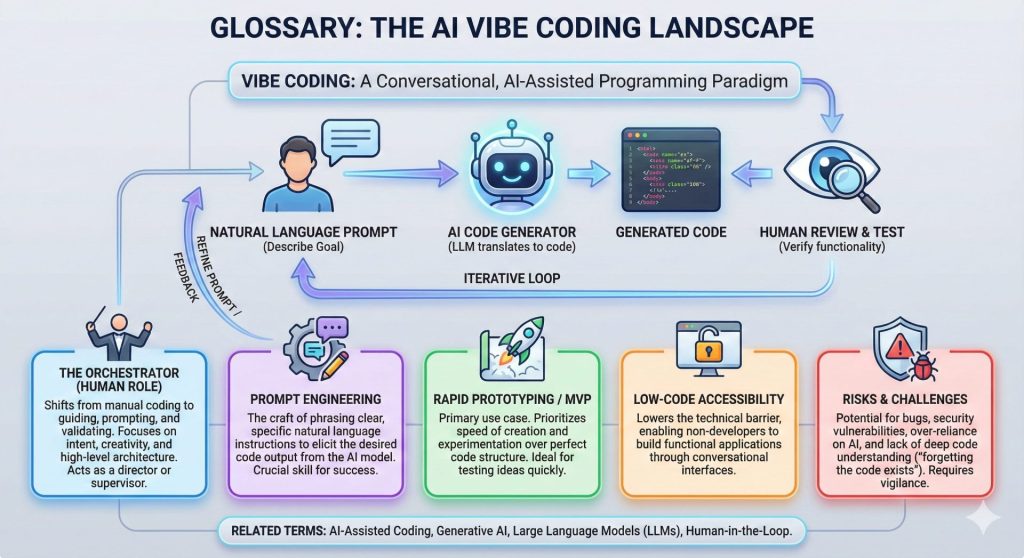
Glossary of Terms
A
Agile Development
Agile development is a way of building things in small, quick steps. Instead of trying to build a whole app at once, you build one small piece, test it, and then build the next. This makes it easier to make changes and improvements as you go. It is like building a Lego castle one section at a time, so you can see how it looks and make adjustments along the way.
AI Agent
An AI agent is like a smart helper that can do tasks for you. In vibe coding, an AI agent can understand your instructions and write code, fix problems, and even suggest ideas. It is like having a personal assistant who is an expert in coding.
AI Coding Assistant
An AI coding assistant is a tool that helps you write code. It can be part of a website or a special program you use. You can ask it to write code for you, explain what a piece of code does, or help you find mistakes. Popular examples include GitHub Copilot, ChatGPT, and Claude.
API (Application Programming Interface)
An API is like a messenger that lets different computer programs talk to each other. For example, if you want your app to show the weather, you can use a weather API to get the information from a weather service. This way, you do not have to build your own weather station.
Architecture
Architecture is the overall plan or design of a computer program. It is like the blueprint for a house. It shows how all the different parts of the program fit together and work with each other. A good architecture makes the program easier to build and change later.
B
Backend
The backend is the part of an app that you do not see. It works behind the scenes to make everything run smoothly. It includes things like the server, the database, and the logic that makes the app work. It is like the kitchen in a restaurant, where the food is prepared before it is brought out to you.
Boilerplate
Boilerplate is code that is used over and over again in many different programs. It is like the standard parts of a form that you have to fill out every time. AI coding assistants are great at writing boilerplate code for you, which saves you a lot of time.
Blueprint
A blueprint is a detailed plan that an AI creates before it starts building your app. It shows what the app will look like, what features it will have, and what technology it will use. You can review the blueprint and make changes before the AI starts writing the code.
C
Cloud Run
Cloud Run is a service from Google that lets you run your app on the internet. It is like a stage where your app can perform for the world. It automatically handles a lot of the technical stuff, so you can focus on building your app.
Code Generation
Code generation is the process of an AI automatically writing code for you. You give the AI instructions in plain English, and it turns them into code that a computer can understand.
Code Review
Code review is when you or someone else checks the code to make sure it is good. It is like having a friend read your story to check for spelling mistakes and make sure it makes sense. This helps to find problems and improve the quality of the code.
Custom GPT
A Custom GPT is a version of ChatGPT that you can personalize for a specific purpose. You can give it special instructions and information so that it becomes an expert in a particular topic. For example, you could create a Custom GPT that is an expert in writing marketing emails.
D
Database
A database is where an app stores all of its information. It is like a library for your app, where it can keep track of user accounts, settings, and other data. When the app needs to remember something, it can look it up in the database.
Debugging
Debugging is the process of finding and fixing mistakes in your code. It is like being a detective and looking for clues to figure out why something is not working correctly. AI coding assistants can help you with debugging by suggesting what might be wrong.
Deployment
Deployment is the process of making your app available for people to use. It is like the grand opening of a new store. Once your app is deployed, people can visit it on the internet or download it to their phones.
Documentation
Documentation is writing that explains how your code works. It is like a user manual for your app. Good documentation makes it easier for you and other people to understand and use your code.
E
Edge Case
An edge case is a rare or unusual situation that might cause your code to break. For example, what happens if a user enters their name with numbers in it? Thinking about edge cases helps you make your app more reliable.
Endpoint
An endpoint is a specific address where an API can be accessed. It is like a specific window at a post office where you go to send a certain type of package. Each endpoint has a specific purpose.
Error Handling
Error handling is the part of your code that deals with problems when they happen. It is like having a plan for what to do if you spill your drink. Good error handling prevents your app from crashing and can give users helpful messages.
F
Flask
Flask is a tool that helps you build web apps using the Python programming language. It provides a simple way to get started and is great for building small to medium-sized apps.
Flow
Flow is a state of being so focused on what you are doing that you lose track of time. Vibe coding can help you stay in the flow because you do not have to stop and think about every little detail of the code.
Formatter
A formatter is a tool that automatically makes your code look neat and organized. It is like a robot that cleans up your room for you. This makes your code easier to read and understand.
Frontend
The frontend is the part of an app that you see and interact with. It is also called the user interface (UI). It includes all the buttons, menus, and other visual elements. It is like the dining room of a restaurant, where you sit and enjoy your meal.
Full-stack
Full-stack refers to both the frontend and the backend of an app. A full-stack developer is someone who can work on both parts. Vibe coding can help you build full-stack apps, but it is important to remember that it is a tool to help you, not a replacement for learning how to code.
G
GitHub Copilot
GitHub Copilot is a popular AI coding assistant that works with many code editors. It can suggest code as you type, answer your questions, and help you with many other coding tasks.
H
Hardcoded
Hardcoded means that a value is written directly into the code, instead of being stored in a place where it can be easily changed. For example, if you write your name directly in the code, it is hardcoded. It is usually better to avoid hardcoding so that your code is more flexible.
I
IDE (Integrated Development Environment)
An IDE is a program that you use to write code. It usually includes a text editor, a debugger, and other tools that make it easier to write and test your code. Popular IDEs include Visual Studio Code and JetBrains.
Iterative Development
Iterative development is a way of building things in cycles. You build a small piece, get feedback, and then make improvements in the next cycle. This is a key part of agile development and is very similar to how you work with an AI in vibe coding.
L
Linter
A linter is a tool that checks your code for mistakes and bad habits. It is like a grammar checker for your code. It can help you write better code and avoid common problems.
Live Preview
A live preview is a feature that lets you see what your app looks like as you are building it. This is very helpful because you can see the results of your changes right away.
LLM (Large Language Model)
An LLM is a type of AI that is very good at understanding and generating human language. ChatGPT and Claude are examples of LLMs. In vibe coding, you use an LLM to turn your plain English instructions into code.
Logic
Logic is the part of your code that makes decisions. It is like the brains of your app. For example, the logic might decide what to do when a user clicks a button.
Low-Code
Low-code is a way of building apps that requires very little coding. You mostly use visual tools and pre-built blocks to create your app. Vibe coding is a form of low-code development.
M
Micro App
A micro app is a small, simple app that is designed to do one thing very well. For example, you could build a micro app that converts temperatures from Celsius to Fahrenheit. Vibe coding is great for building micro apps quickly.
MVP (Minimum Viable Product)
An MVP is the simplest version of your app that you can release to users. It has just enough features to be useful. Building an MVP is a good way to test your idea and get feedback from users before you spend a lot of time building more features.
Multimodal Programming
Multimodal programming is a way of coding that uses more than just text. You might use your voice, draw a picture, or use other inputs to tell the AI what you want to build. This can make coding even more natural and intuitive.
N
Natural Language Prompts
Natural language prompts are instructions that you give to an AI in plain English. For example, you might say, “Create a button that says ‘Click Me’.” The AI then turns this prompt into code.
No-Code
No-code is a way of building apps without writing any code at all. You use visual tools to drag and drop elements to create your app. This is a great option for people who have no coding experience.
P
Pair Programmer
A pair programmer is another person who codes with you. In vibe coding, the AI can act as your pair programmer. It can help you write code, find mistakes, and come up with ideas.
Performance
Performance refers to how fast and efficient your app is. A high-performance app will run smoothly and not use too much of your computer’s resources. It is important to think about performance when you are building an app.
Production
Production is the real-world environment where your app is used by people. When your app is in production, it is live and available to the public.
Prompt Engineering
Prompt engineering is the skill of writing good instructions for an AI. The better your prompts are, the better the AI will be at understanding what you want and generating the right code.
Prototype
A prototype is an early version of your app that you can use to test your ideas. It might not have all the features of the final app, but it is a good way to see how your app will work and get feedback from others.
Python
Python is a popular programming language that is known for being easy to learn and use. It is a great language for beginners and is often used in vibe coding.
R
Refactor
To refactor your code means to improve its design without changing what it does. It is like tidying up your room to make it more organized. Refactoring can make your code easier to understand and maintain.
Refinement
Refinement is the process of making your code better. After the AI generates the initial code, you will need to refine it to make sure it is correct, efficient, and easy to read.
S
SQL (Structured Query Language)
SQL is a language that is used to work with databases. You can use SQL to get information from a database, add new information, and update existing information.
Syntax
Syntax is the set of rules for how to write code in a particular programming language. It is like the grammar of a language. If you make a syntax error, your code will not work.
T
Tailored
Tailored means that something is customized for a specific need. For example, you can create a tailored version of ChatGPT that is an expert in a particular topic.
Threading
Threading is a way of running multiple tasks at the same time in your app. This can make your app more responsive and efficient. It is an advanced topic that you might not need to worry about when you are just starting out.
U
Unit Tests
Unit tests are small tests that check if a specific part of your code is working correctly. They are like mini-exams for your code. Writing unit tests is a good way to make sure your code is reliable.
User Authentication
User authentication is the process of checking if a user is who they say they are. This is usually done with a username and password. It is an important part of many apps that have user accounts.
V
Validated Input
Validated input means that you have checked the information that a user has entered to make sure it is safe and correct. This is important for preventing security problems and making sure your app works correctly.
Variables
Variables are like containers that you can use to store information in your code. For example, you could use a variable to store a user’s name.
VibeOps
VibeOps is a new idea that combines vibe coding with the process of running and managing software. It is about using AI to automate not just the writing of code, but also the deployment, monitoring, and maintenance of apps.
Visual Studio Code
Visual Studio Code is a popular code editor that is free to use. It has many features that make it easier to write and debug code, and it works well with AI coding assistants like GitHub Copilot.
References
[1] IBM. (n.d.). What is Vibe Coding? Retrieved from
[2] Google Cloud. (2025, December 4 ). Vibe Coding Explained: Tools and Guides. Retrieved from
[3] GitHub. (2025, August 15 ). What Is Vibe Coding? Retrieved from
